
How to disable IPv6 in Raspbian [WORKING]
I had connection problems with my Raspberry Pi, it dropped connection over IPv4 periodically.
My solution was to disable IPv6, and the Pi’s network connections (over IPv4) went stable!
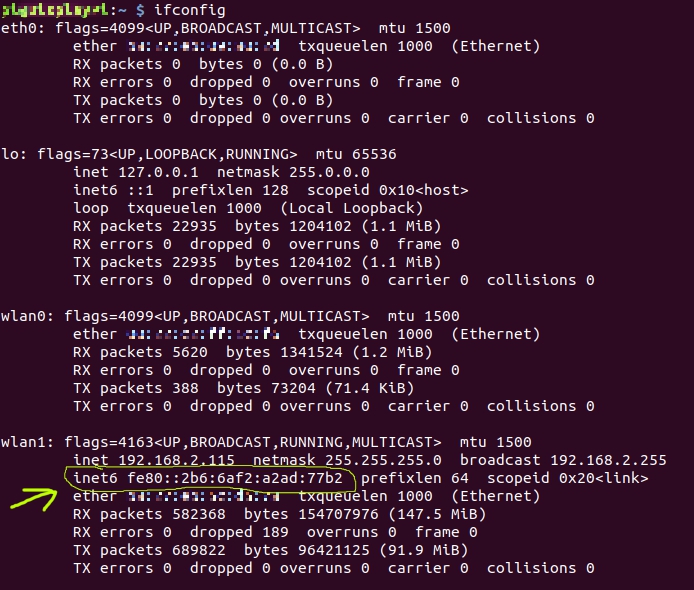
To check if you have any IPv6 address, run:
| 1 | $ ifconfig |
Check for “inet6”, see picture above.
To disable IPv6:
- Edit “/etc/sysctl.conf”:
$sudonano/etc/sysctl.confAdd this to the end:
1234net.ipv6.conf.all.disable_ipv6=1net.ipv6.conf.default.disable_ipv6=1net.ipv6.conf.lo.disable_ipv6=1net.ipv6.conf.eth0.disable_ipv6 = 1Save and close the file. - Edit “/etc/rc.local”:
$sudonano/etc/rc.localAdd this to the end (but before “exit 0”):
1service procps reloadSave and close the file. - Reboot
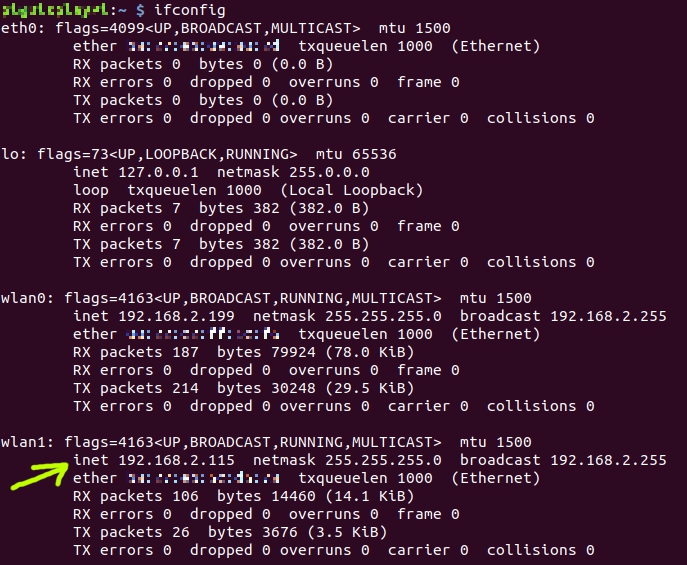
- Check with “ifconfig” if the IPv6 address has disappeared.
$ifconfigSee my result in picture below, “inet6” is missing:
Done!
Enjoy! ?